Advanced markers
Google's Advanced Markers with colored pins and glyphs: text, a color or an SVG. They need a map ID, DEMO_MAP_ID works for testing.
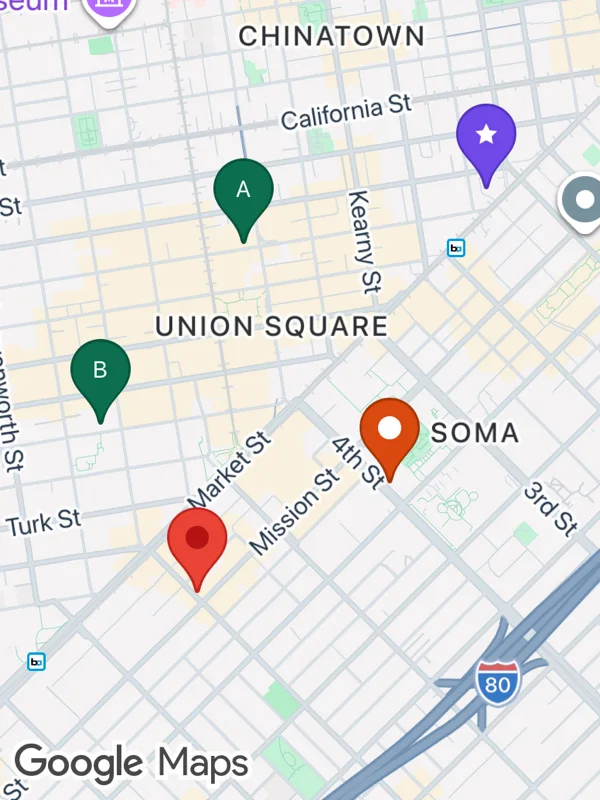
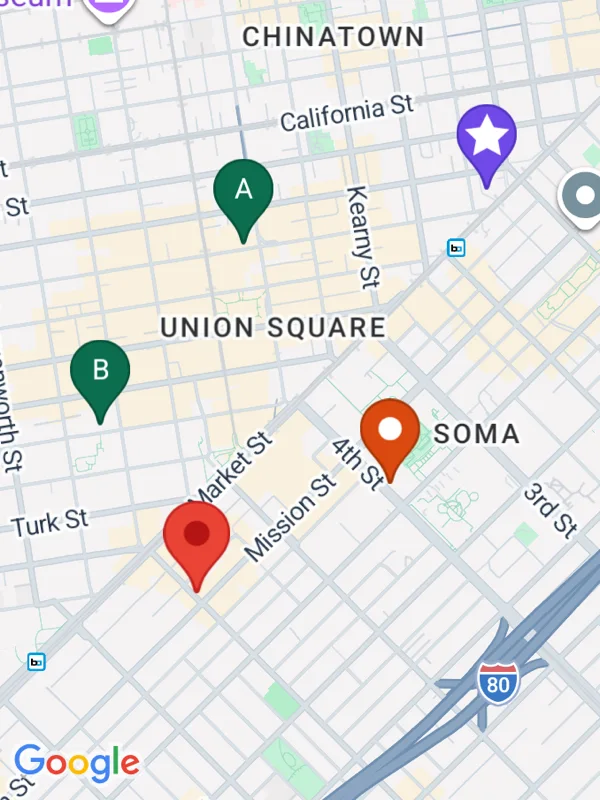
Uses markers, mapOptions.
advanced-markers.tsx
import React from 'react';

import {
  GoogleMapsView,
  type RNAdvancedMarkerOptions,
  type RNMarker,
  type RNMarkerPinGlyph,
} from 'react-native-google-maps-plus';

import { GREEN, ORANGE, ll, pinZ, svg } from './shared';

const star = svg(
  20,
  20,
  `<path d="M10 1 L12.9 6.9 L19.5 7.8 L14.7 12.4 L15.9 19 L10 15.8 L4.1 19 L5.3 12.4 L0.5 7.8 L7.1 6.9 Z" fill="#ffffff"/>`
);

const pin = (
  backgroundColor: string,
  borderColor: string,
  glyph: RNMarkerPinGlyph
): RNAdvancedMarkerOptions => ({
  pinConfig: { backgroundColor, borderColor, glyph },
});

const white = '#ffffff';

const markers: RNMarker[] = [
  {
    id: 'a',
    coordinate: ll(37.7895, -122.4075),
    advancedOptions: pin(GREEN, '#08533b', { text: 'A', textColor: white }),
  },
  {
    id: 'b',
    coordinate: ll(37.7852, -122.4118),
    advancedOptions: pin(GREEN, '#08533b', { text: 'B', textColor: white }),
  },
  {
    id: 'dot',
    coordinate: ll(37.7838, -122.4031),
    advancedOptions: pin(ORANGE, '#a33608', { color: white }),
  },
  {
    id: 'star',
    coordinate: ll(37.7908, -122.4002),
    advancedOptions: pin('#7048e8', '#5235c0', { iconSvg: star }),
  },
  // Without pinConfig: Google's default red pin.
  { id: 'default', coordinate: ll(37.7812, -122.4089), advancedOptions: {} },
].map((m) => ({ ...m, zIndex: pinZ(m.coordinate) }));

export default function AdvancedMarkers() {
  return (
    <GoogleMapsView
      style={{ flex: 1 }}
      mapOptions={{
        mapId: 'DEMO_MAP_ID',
        camera: { center: ll(37.7858, -122.4058), zoom: 14.3 },
      }}
      markers={markers}
    />
  );
}
Colors, map styles and the SVG helpers svg, marker and pill come from shared.ts. Marker text uses the Roboto fonts bundled with the example app, see fonts.