Friends nearby
Friends as avatar markers with a gradient ring, an online dot and their name with the time they were last seen.
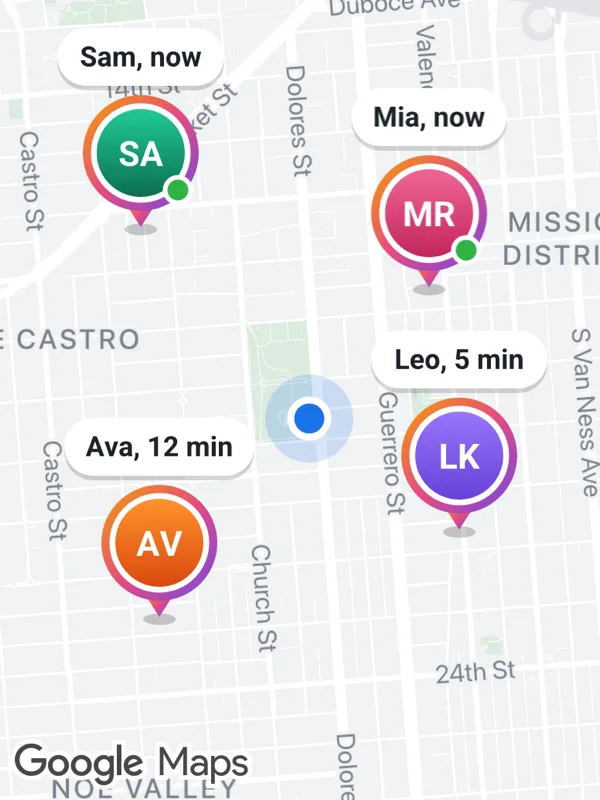
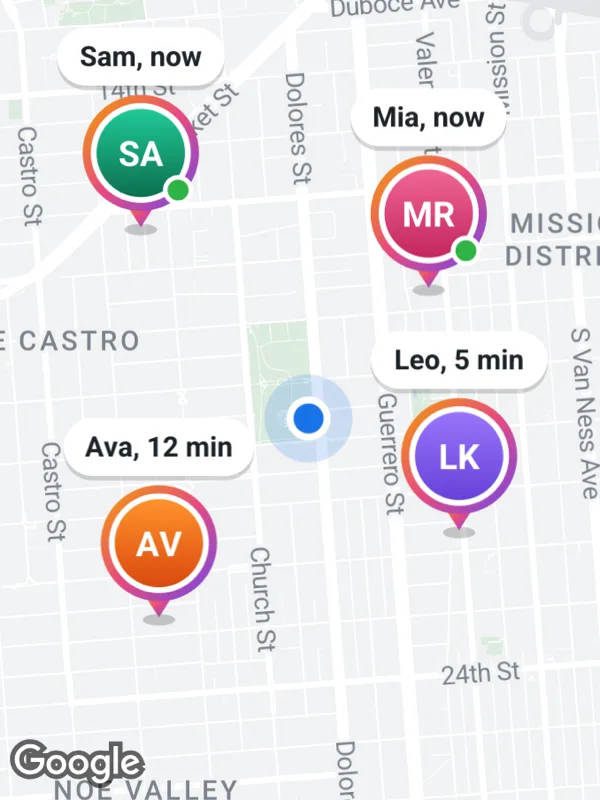
Uses markers.
friends.tsx
import React from 'react';

import { GoogleMapsView } from 'react-native-google-maps-plus';

import {
  BOLD,
  GREEN,
  ORANGE,
  Z,
  lightStyle,
  ll,
  marker,
  pill,
  pinZ,
  svg,
  youAreHere,
} from './shared';

const friends = [
  {
    at: ll(37.7622, -122.4222),
    initials: 'MR',
    colors: ['#f06595', '#c2255c'],
    name: 'Mia, now',
    online: true,
  },
  {
    at: ll(37.7558, -122.4212),
    initials: 'LK',
    colors: ['#9775fa', '#6741d9'],
    name: 'Leo, 5 min',
    online: false,
  },
  {
    at: ll(37.7638, -122.4318),
    initials: 'SA',
    colors: ['#20c997', GREEN],
    name: 'Sam, now',
    online: true,
  },
  {
    at: ll(37.7535, -122.4312),
    initials: 'AV',
    colors: ['#ff922b', ORANGE],
    name: 'Ava, 12 min',
    online: false,
  },
];

// Name on top, avatar below, anchored at the tip under the avatar.
function avatar(friend: (typeof friends)[number]) {
  const p = pill(friend.name, { size: 12 });
  const w = Math.max(p.width, 56);
  const cx = w / 2;
  const cy = p.height + 26;
  const h = p.height + 62;
  const [from, to] = friend.colors;
  return {
    icon: svg(
      w,
      h,
      `<defs>
         <linearGradient id="ring" x1="0" y1="0" x2="1" y2="1">
           <stop offset="0" stop-color="#f59f00"/>
           <stop offset="0.5" stop-color="#e64980"/>
           <stop offset="1" stop-color="#7048e8"/>
         </linearGradient>
         <linearGradient id="face" x1="0" y1="0" x2="0" y2="1">
           <stop offset="0" stop-color="${from}"/>
           <stop offset="1" stop-color="${to}"/>
         </linearGradient>
       </defs>
       <ellipse cx="${cx}" cy="${h - 3}" rx="7" ry="2.5" fill="#000000" opacity="0.2"/>
       <path d="M${cx - 7} ${cy + 21} L${cx} ${cy + 32} L${cx + 7} ${cy + 21} Z" fill="url(#ring)"/>
       <circle cx="${cx}" cy="${cy}" r="25" fill="url(#ring)"/>
       <circle cx="${cx}" cy="${cy}" r="21.5" fill="#ffffff"/>
       <circle cx="${cx}" cy="${cy}" r="19" fill="url(#face)"/>
       <text x="${cx}" y="${cy + 0.5}" text-anchor="middle" dominant-baseline="central" font-size="15" ${BOLD} fill="#ffffff">${friend.initials}</text>
       ${friend.online ? `<circle cx="${cx + 16}" cy="${cy + 16}" r="6.5" fill="#ffffff"/><circle cx="${cx + 16}" cy="${cy + 16}" r="4.5" fill="#2fb344"/>` : ''}
       <g transform="translate(${(w - p.width) / 2} 0)">${p.body}</g>`
    ),
    anchor: { x: 0.5, y: (h - 3) / h },
  };
}

export default function FriendsNearby() {
  return (
    <GoogleMapsView
      style={{ flex: 1 }}
      customMapStyle={lightStyle}
      mapOptions={{ camera: { center: ll(37.7593, -122.4265), zoom: 14.15 } }}
      markers={[
        marker('user', ll(37.7588, -122.4262), youAreHere, { zIndex: Z.user }),
        ...friends.map((friend) => {
          const { icon, anchor } = avatar(friend);
          return marker(friend.initials, friend.at, icon, {
            anchor: anchor,
            zIndex: pinZ(friend.at),
          });
        }),
      ]}
    />
  );
}
Colors, map styles and the SVG helpers svg, marker and pill come from shared.ts. Marker text uses the Roboto fonts bundled with the example app, see fonts.